Tuesday, February 17, 2009

ExportSqlCe version 1.7 released

This latest release contains the following changes and improvements:

Added Update and Delete Rules on Foreign Keys
Improved error handling
Fixed output file naming bug
Binary and varbinary columns were missing size in CREATE TABLE statement

- and it now has a nice icon :-)

Go and get it here.

Monday, February 16, 2009

SqlCeCmd – SQL Compact Command Line Tool

I have started a new project on CodePlex, http://www.codeplex.com/SqlCeCmd. This project is intended to be the SQL Compact equivalent to the SQL Server SQLCMD utility. It will allow you to administer SQL Compact databases on the desktop without having SQL Server Management Studio or Visual Studio installed. You can review the intended features here. Please provide any comments you may have at the CodePlex site. A quick syntax overview:

sqlcecmd

[ { -d SQL Compact connection string} ]

[ -e shrink | compact | create | repairdelete | repairrecover ]

[ -z new password ]

[ -q "cmdline query" ]

[ -e echo input ]

[ -i input_file ]

[ -o output_file ]

[ -R use client regional settings ]

[ -h headers ][ -s col_separator ] [ -w column_width ]

[ -W remove trailing spaces ]

[ -k [ 1 | 2 ] remove[replace] control characters ]

[ -y display_width ] [-Y display_width ]

[ -b on error batch abort ]

[ -c cmd_end ]

[ -? show syntax summary ]

Sunday, February 1, 2009

SQL Compact 3.5 Schema Provider for CodeSmith now available

I have modified, improved and updated the existing SQL Compact 2005 CodeSmith Schema Provider. It is available here: http://community.codesmithtools.com/forums/p/9303/34491.aspx#34491

New/enhanced features include:

GetDatabaseName:
Now returns the sdf file name without extension

GetTableColumns:
Support for all 3.5 data types, including rowversion
Excludes system columns
Several extended properties added

GetTableIndexes:
Bug fix for same index name on different tables

GetTableKeys:
Added - gets all foreign keys

GetTablePrimaryKey:
Bug fix for returning not only primary keys.

GetTables:
Excludes system tables

Tested with Nettiers 2.3.b2 (with a slightly modified Nettiers.cst).

The Schema Provider in action:

image 

Technorati Tags: ,,

Sunday, January 25, 2009

Binding SQL Compact data to WPF in less than 100 lines of code

In this walkthrough, I will show how you can bind a WPF Listview to data from a SQL Compact database table using LINQ to SQL, and also show how persist changes to the list in the SQL Compact database. I am using Visual Studio 2008 SP1 and SQL Compact 3.5 SP1.

Start by creating a new C# WPF project, called SQLCeWPF. Do not create a directory for the solution. You should now have a folder like this:

image 

Then copy the 3.5 Northwind.sdf from %ProgramFiles%\C:\Program Files\Microsoft SQL Server Compact Edition\v3.5\Samples to the project folder (in my case c:\projects\SQLCeWPF).

Then generate the LINQ to SQL dbml file:

1. Open a Visual Studio 2008 Command Prompt (shortcut under Programs, VS 2008, VS Tools)

2. Make the project directory folder the current folder:

cd c:\projects\sqlcewpf

and run this SQLMetal command:

sqlmetal /dbml:Northwind.dbml Northwind.sdf

and close the command window.

This will generate a LINQ to SQL dbml file in the project folder. Now include this file in your project, select Show All Files in Solution Explorer and include the dbml file (do NOT include the sdf file).

In the WPF Designer, add a listbox, a textbox and 3 buttons to the form. Rename the buttons from buttonx to add, delete and save. The form now looks like so in the designer:

image

Add event handlers for the 3 buttons in the code behind file by double clicking each button.

Now add a class file to the project, name it ObservableShippers.cs. This class connects the UI to the LINQ to SQL generated datacontext, and persists changes to the database.

using System;
using System.Linq;
using System.Collections.ObjectModel;
using System.Data.Linq;

namespace SQLCeWPF
{
public class ObservableShippers : ObservableCollection<Shippers>
{
private Northwind dataDC;
private bool ignoreEvents;

public ObservableShippers()
{
this.ignoreEvents = true;
this.dataDC = new Northwind("Data Source=C:\\Projects\\SQLCeWPF\\Northwind.sdf");
var shipperList = from shipper in dataDC.Shippers
orderby shipper.CompanyName
select shipper;
// Cannot add multiple items to ObservableCollection in single step :-(
foreach (Shippers shipper in shipperList)
{
this.Add(shipper);
}
this.ignoreEvents = false;
}

protected override void OnCollectionChanged(System.Collections.Specialized.NotifyCollectionChangedEventArgs e)
{
if (!ignoreEvents)
{
switch (e.Action)
{
case System.Collections.Specialized.NotifyCollectionChangedAction.Add:
foreach (Shippers shipper in e.NewItems)
{
dataDC.Shippers.InsertOnSubmit(shipper);
}
break;
case System.Collections.Specialized.NotifyCollectionChangedAction.Remove:
foreach (Shippers shipper in e.OldItems)
{
dataDC.Shippers.DeleteOnSubmit(shipper);
}
break;
case System.Collections.Specialized.NotifyCollectionChangedAction.Replace:
break;
default:
break;
}
}
base.OnCollectionChanged(e);
}

public void Save()
{
if (this.dataDC != null)
{
this.dataDC.SubmitChanges();
}
}
}
}


This class inherits from ObservableCollection, which exposes the OnCollectionChanged event. Handling this events allows synchronization with the LINQ to SQL DataContext.


Now bind the WPF form to this collection like so, in the Window1.xaml.cs file (add the lines in bold):


private ObservableShippers shippers;


public Window1()

{


    InitializeComponent();


    ShowShippers();


}


private void ShowShippers()

{


      shippers = new ObservableShippers();


       this.listBox1.ItemsSource = shippers;


}


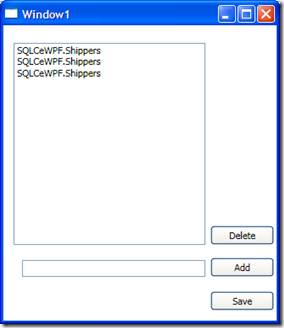
Press F5 to run the app, and it should look something like this:


image


(Don’t worry - We fix the Shipper name later).


Now add the button event handler code:


Add button:

if (textBox1.Text.Length > 0)

{


    Shippers newShipper = new Shippers();


    newShipper.CompanyName = textBox1.Text;


    shippers.Add(newShipper);


    textBox1.Text = "";


}


Delete button:

if (this.listBox1.SelectedItem != null)

           {


               shippers.Remove((Shipper)listBox1.SelectedItem);


           }


Save button:

shippers.Save();

ShowShippers();


Now to show the Supplier name in the list, override the Shippers class ToString() method. To do this, add  a new class file to the project, called Shippers.cs with the following content:


namespace SQLCeWPF

{


    public partial class Shippers


    {


        public override string ToString()


        {


            return this.CompanyName;


        }


    }


}


Now try to run the app. Shippers can be added and deleted from the Shippers table using WPF, and the project does not contain any reference to System.Data.SqlServerCe. All in less than 100 lines of (your own) code. The complete sample can be downloaded from here:


http://cid-47e59e4beb70472b.office.live.com/self.aspx/SQL%20Compact/SQLCeWPF.zip


Thanks to these 2 CodeProject articles for inspiration:


http://www.codeproject.com/KB/WPF/binding_in_linq-sql.aspx


and


http://www.codeproject.com/KB/linq/Compact_LINQ.aspx


Technorati Tags: ,

Friday, January 23, 2009

Inserting images from VBA

Inserting images into a SQL Compact from VB(A) does not appear to be possible using vanilla VBA code (please correct me if I am wrong). In order to work around this limitation, it is possible to create a function in C#, and call this function from VBA. This excellent post got me going. This is the VBA Code:

Sub InsertBlob()

Dim IMG_FILE As String
Dim intFile As Integer
Dim ImgBuff() As Byte
Dim ImgLen As Long
Dim ret As String

IMG_FILE = "C:\ErikEJ.jpg"
'Read/Store GIF file in ByteArray
intFile = FreeFile
Open IMG_FILE For Binary As #intFile
ImgLen = LOF(intFile)
ReDim ImgBuff(ImgLen) As Byte
Get #intFile, , ImgBuff()
Close #intFile

Dim sqlCeUtil As New SqlCompactUtility
ret = sqlCeUtil.SaveBlob(ImgBuff(), "Data Source=C:\Data\SQLCE\NorthWind2.sdf", "INSERT INTO Images (Picture) VALUES (@Blob)", "@Blob")

End Sub


First a Byte array with the image contents is created. Then the .NET based method (SaveBlob) is invoked.


The SaveBlob method takes 4 parameters:


1. The byte array


2. The SQL Compact connection string


3. The Insert statement


4. The parameter name


In order for this to work, add a reference to the .NET dll library from the VB(A) project, the code of which is shown below (created per the instructions in the "A Basic Walk Through" part of the post mentioned above). If you have followed the instruction in the blog, the DLL should appear in the Add Reference dialog once built.


using System;
using System.Data.SqlServerCe;
using System.Runtime.InteropServices;

namespace SqlCompactInterop
{
public class SqlCompactUtility
{
//SaveBlob(data, @"Data Source=C:\Data\SQLCE\NorthWind2.sdf", "INSERT INTO Images (Picture, Id) VALUES (@Blob, 2)", "@Blob");
public string SaveBlob(byte[] data, string connectionString, string insertStatement, string parameterName)
{
try
{
using (SqlCeConnection conn = new SqlCeConnection(connectionString))
{
SqlCeCommand cmd = new SqlCeCommand(insertStatement);
cmd.Parameters.Add(
new SqlCeParameter(parameterName, System.Data.SqlDbType.Image, data.Length));
cmd.Parameters[parameterName].Value = data;
cmd.Connection = conn;
conn.Open();
cmd.ExecuteNonQuery();
cmd.Dispose();
return string.Empty;
}
}
catch (SqlCeException e)
{
return ShowErrors(e);
}
}

// Error handling routine that generates an error message
private string ShowErrors(SqlCeException e)
{
SqlCeErrorCollection errorCollection = e.Errors;

System.Text.
StringBuilder bld = new System.Text.StringBuilder();
Exception inner = e.InnerException;

if (null != inner)
{
bld.Append(inner.ToString());
}
// Enumerate the errors to a message box.
foreach (SqlCeError err in errorCollection)
{
bld.Append(
"\n Error Code: " + err.HResult.ToString("X"));
bld.Append(
"\n Message : " + err.Message);
bld.Append(
"\n Minor Err.: " + err.NativeError);
bld.Append(
"\n Source : " + err.Source);

// Enumerate each numeric parameter for the error.
foreach (int numPar in err.NumericErrorParameters)
{
if (0 != numPar) bld.Append("\n Num. Par. : " + numPar);
}

// Enumerate each string parameter for the error.
foreach (string errPar in err.ErrorParameters)
{
if (String.Empty != errPar) bld.Append("\n Err. Par. : " + errPar);
}


}
return bld.ToString();
}

}

}


"Hope this helps"


kick it on DotNetKicks.com

Wednesday, January 21, 2009

ExportSqlCE - new release with support for SQL Compact 3.0/3.1

The post title says it all! - ExportSqlCE release 1.6 is now available at CodePlex. The reason for the new release is support for exporting SQL Server 2005 Mobile Edition (3.0) and SQL Server Compact Edition (3.1) sdf files. Identity columns are not included in the CREATE TABLE statement, as "SET IDENTITY_INSERT" is not available with SQL Compact 3.0/3.1. Support for 3.1 is enabled by ading a new solution and project file to the source, which in turn generates a new exe: ExportSqlCe31.exe. This allows both versions to share a single codebase, but reference different versions of System.Data.SqlServerCe, with conditional compilation symbols. Please try it out and let me know what you think.

Mærker fra Technorati: ,,

Monday, January 19, 2009

ExportSQLCe – support for SQL Compact 3.1

The source (not a release yet) for ExportSQLCe has been updated to support SQL Compact 3.1 – please feel free to try it out.