Monday, April 6, 2020


Monday, March 30, 2020
Sunday, March 22, 2020
Saturday, March 31, 2018
Using Entity Framework 6 and SQLite with Visual Studio 2017
The System.Data.SQLite DDEX provider does not support Visual Studio 2017. This post describes how to work with SQLite and Entity Framework 6 in Visual Studio 2017, using the "SQLite Toolbox" DDEX provider for EF6. Notice that this provider only supports the EF 6 Tools, and not other Data Source scenarios, for example Typed DataSets.
Select "Full Installation"
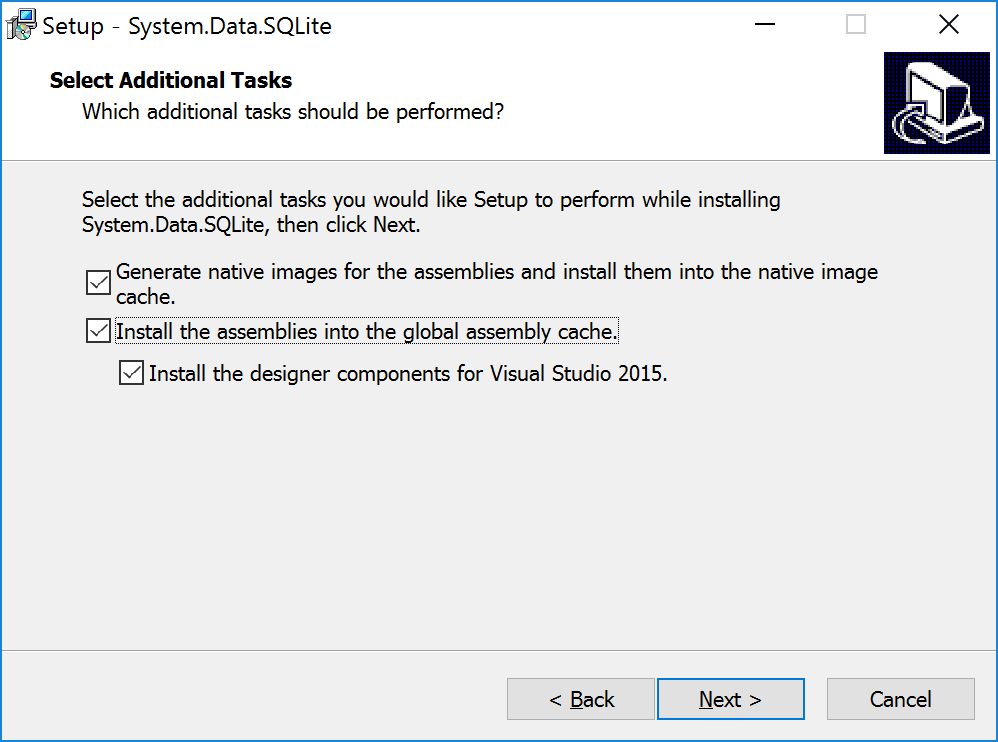
Select: Install the assemblies into the global assembly cache - Install VS designer components
Restart Visual Studio
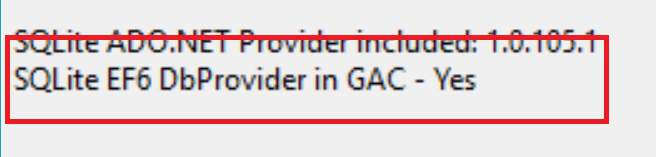
Verify that the EF6 provider is installed in GAC from the Toolbox "About" dialog:

If the EF6 provider is not in GAC, this may be due to an invalid entry in machine.config, located in the C:\WINDOWS\Microsoft.NET\Framework\v4.0.30319\Config folder. The only SQLite related entry should look like this, with this exact version number:
Build project!
Packages.config should look like this after install:
App.config should look like this:
Use "SQLite Provider (Simple for EF6 by ErikEJ)" when creating a connection to your SQLite database file.

- Install Toolbox
- Install SQLite in GAC
- Install SQLite EF provider in project
- Run EDM Wizard
Install latest Toolbox
Once per Visual Studio edition (daily build at https://github.com/ErikEJ/SqlCeToolbox/wiki/Release-notes )Install SQLite in GAC
Once per machine. Download sqlite-netFx46-setup-bundle-x86-2015-1.0.108.0.exe (from https://system.data.sqlite.org/index.html/doc/trunk/www/downloads.wiki)Select "Full Installation"
Select: Install the assemblies into the global assembly cache - Install VS designer components
Restart Visual Studio
Verify that the EF6 provider is installed in GAC from the Toolbox "About" dialog:
If the EF6 provider is not in GAC, this may be due to an invalid entry in machine.config, located in the C:\WINDOWS\Microsoft.NET\Framework\v4.0.30319\Config folder. The only SQLite related entry should look like this, with this exact version number:
<system.data>
    <DbProviderFactories>
        <add name="SQLite Data Provider"
             invariant="System.Data.SQLite.EF6"
             description=".NET Framework Data Provider for SQLite"
             type="System.Data.SQLite.EF6.SQLiteProviderFactory,
                    System.Data.SQLite.EF6,
                    Version=1.0.108.0,
                    Culture=neutral,
                    PublicKeyToken=db937bc2d44ff139"
        />
    </DbProviderFactories>
</system.data>
Install System.Data.Sqlite NuGet package
Install using Package Manager Console or NuGet Manager in each project.PM> Install-Package System.Data.SQLite
Build project!
Packages.config should look like this after install:
<packages>
  <package id="EntityFramework" version="6.2.0" targetFramework="net461" />
  <package id="System.Data.SQLite" version="1.0.108.0" targetFramework="net461" />
  <package id="System.Data.SQLite.Core" version="1.0.108.0" targetFramework="net461" />
  <package id="System.Data.SQLite.EF6" version="1.0.108.0" targetFramework="net461" />
  <package id="System.Data.SQLite.Linq" version="1.0.108.0" targetFramework="net461" />
</packages>
<configuration>
  <configSections>
    <section name="entityFramework" type="System.Data.Entity.Internal.ConfigFile.EntityFrameworkSection, EntityFramework, Version=6.0.0.0, Culture=neutral, PublicKeyToken=b77a5c561934e089" requirePermission="false" />
  </configSections>
  <entityFramework>
    <providers>
      <provider invariantName="System.Data.SQLite.EF6" type="System.Data.SQLite.EF6.SQLiteProviderServices, System.Data.SQLite.EF6" />
    </providers>
  </entityFramework>
  <system.data>
    <DbProviderFactories>
      <remove invariant="System.Data.SQLite.EF6" />
      <add name="SQLite Data Provider (Entity Framework 6)" invariant="System.Data.SQLite.EF6" description=".NET Framework Data Provider for SQLite (Entity Framework 6)" type="System.Data.SQLite.EF6.SQLiteProviderFactory, System.Data.SQLite.EF6" />
    <remove invariant="System.Data.SQLite" />
   </DbProviderFactories>
  </system.data>
</configuration>
Run Entity Data Model Wizard
Add, New Item, Data, ADO.NET Entity Data Model. Choose "EF Designer from Database" or "Code First from Database"Use "SQLite Provider (Simple for EF6 by ErikEJ)" when creating a connection to your SQLite database file.
Wednesday, January 4, 2017
Downloading SQL Server Compact 3.5 SP2 for Devices
A number of developers are still, in 2017, developing new solutions for Windows CE / Windows Mobile using Visual Studio 2008 and SQL Server Compact 3.5 SP2. Unfortunately, Microsoft has removed the official download of the SQL CE 3.5 SP2 package for devices, which contains the cab files for installing the SQL CE runtime on various processor flavors of Windows CE / Windows Mobile and also contains a cab file for installing a System.Data.SqlClient (ADO.NET provider for SQL Server), that allows you to access SQL Server directly from a Windows Mobile device.
In this blog post I will describe the steps required to get the Device MSI installed on your development PC. Luckily, it is still currently possible to request the latest updates/hotfixes of the 3.5 SP2 runtime – I have a comprehensive list here.
We can take advantage of the fact, that each “patch” is essentailly a full release of all applicable packages, and that build 8109 is a full re-release of all possible packages.
1: Navigate to the KB page for hotfix 8109: https://support.microsoft.com/en-us/kb/2860310
2: Click the “Hotfix Download Available” link (blue button)
3: Accept the license agreemnt if prompted
4: Expand the list of hotfixes to show all 52 packages by clicking the link “Show hotfixes for all platforms and languages” (this text may be localized)
5: Select (put a checkmark next to) the file named: SSCEDeviceRuntime_ENU
6: Enter your email twice, and press the “Request hotfix” button (button text may be localized)
7: You will now receive an email with a link to the hotfix, download the linked file, named: 465553_ENU_ce_zip.exe
8: Double click the file, and extract it’s compressed contents:
SSCEDeviceRuntime-ENU.msi
9: Double click SSCEDeviceRuntime-ENU.msi to install the Devices SDK:

10: Complete the setup, the cab files are now present in the C:\Program Files (x86)\Microsoft SQL Server Compact Edition\v3.5\Devices folder
Wednesday, December 14, 2016
Entity Framework Core Extensions
This is a list of some of the available Entity Framework Core extensions out there that expand the functionality of the Entity Framework Core runtime. Only libraries that extend DbContext or similar are included, and they must be published on NuGet.org.
The EF team has lists of third party EF Core providers here: https://docs.microsoft.com/en-us/ef/core/providers/
For a similar list of EF 6.x extensions, see my blog post here
Please let me know if I have missed anything, and I will add it to the list.
EFSecondLevelCache.Core
Entity Framework Core Second Level Caching Library.
Second level caching is a query cache. The results of EF commands will be stored in the cache, so that the same EF commands will retrieve their data from the cache rather than executing them against the database again.
Install-Package EFSecondLevelCache.Core
Loads and saves entire detached entity graphs (the entity with their child entities and lists). Inspired by GraphDiff. The idea is also add some plugins to simplificate some repetitive tasks, like auditing and pagination.
Install-Package EntityFrameworkCore.Detached –Pre
Add triggers to your entities with insert, update, and delete events. There are three events for each: before, after, and upon failure.
Install-Package EntityFrameworkCore.Triggers
Reactive extension wrappers for hot observables of Entity Framework entities.
Install-Package EntityFrameworkCore.Rx
EntityFrameworkCore.PrimaryKey
Retrieve the primary key (including composite keys) from any entity as a dictionary.
Install-Package EntityFrameworkCore.PrimaryKey
EntityFrameworkCore.TypedOriginalValues
Get typed access to the OriginalValues of your entity properties. Simple and complex properties are supported, navigation/collections are not.
Install-Package EntityFrameworkCore.TypedOriginalValues
Attempt to capture some good or best practices in an API that supports testing – including a small framework to scan for N+1 queries
Install-Package EFCore.Practices
Sunday, August 28, 2016
In the meantime
Since may last post in February, as few things have happended in the world of Microsoft Data Acces Development:
Entity Framework Core 1.0 has been released at the end of May, including the providers for SQL Server Compact 4.0 and 3.5 (supplied by yours truly). I plan to blog in more detail about using EF Core with this new provider.
A useful SQLite NuGet package has been released, for use with the .NETStandard 1.0 portable platform.
SQL Server 2016 was released, many highlights and improvements to the relational engiene, as highlighted in the “It just runs faster” blog series.
And SQL Server 2016 Developer Edition is now free (was 50 USD earlier)!
Subscribe to:
Posts (Atom)